Mineral management software for Windows
Know what you own, where it is, and what it earns.
Professional desktop software for managing mineral, royalty, and non-operated working interests: your portfolio, your books, and every property on the map. Built around the map, with every record connected to the property itself, and designed with the familiar menus and controls of the Windows software you already use. No subscription, no SaaS. You own the software and your data.
Portfolio Dashboard
See your entire portfolio at a glance.
MineralMaster's Dashboard brings important information from across your portfolio together in one place, providing a quick view of your properties, wells, ownership, revenue, and other key information. From the Dashboard, you can move directly into the underlying property or record.
The Dashboard shows you the portfolio. The map shows you the property.
Bookkeeping
Keep the books with the properties.
MineralMaster brings oil and gas bookkeeping into the same system as the properties, wells, ownership, and interests behind the numbers.
Track income and expenses for mineral, royalty, and non-operated working interests, with every financial record connected to the portfolio it belongs to.
The map
The map isn't just for viewing your properties. It's part of how you manage them.
See the property.
Tracts and wells in PLSS context on a professional basemap.
Open the property.
Select a tract to view its information and go directly to the underlying property records.
Manage the property.
Enter new information for the tract without leaving the map.
Tract Builder
If you can read the legal description, you can map the property.
For PLSS survey lands, identify the township, range, and section, then select the subdivisions and aliquots. MineralMaster constructs the tract geometry and places the property on the integrated map.
Non-PLSS properties: Tract Builder applies to PLSS survey lands. For other properties, tract polygons can be imported or drawn directly on the map.
Tract, title, and lease
Start with what you have.
Property information rarely arrives in order. In MineralMaster, a tract, a title document, or a lease can each stand on its own. Build the property record over time and connect the pieces as they come together.
Sometimes the land comes first.
Create or map a tract when you know the property location, even if the ownership or title information is not yet complete. Add title, leases, ownership, and other records as they become available.
Sometimes the document comes first.
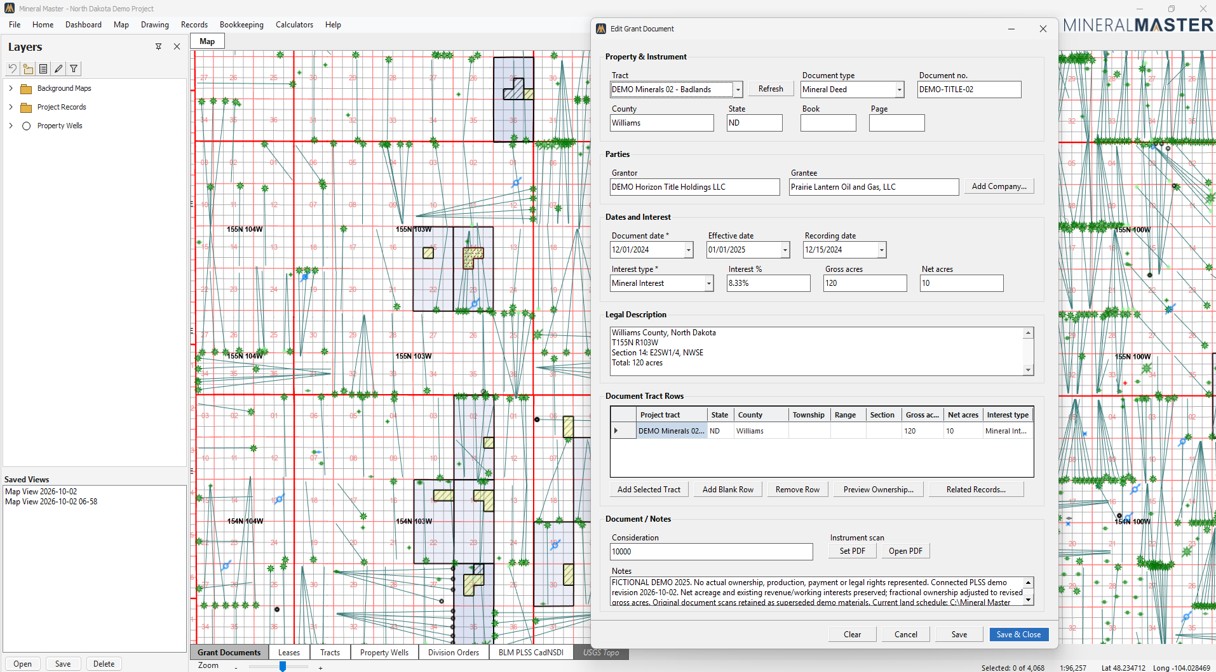
If you begin with a deed, assignment, or other ownership document, record it first and connect it to the appropriate tract and property information when available. Attach the scanned original as a PDF and open it directly from the record.
Sometimes it's the lease.
A lease can be tracked even while the rest of the property record is being assembled, whether it is active, pending, prospective, or simply being maintained as a record.
Ownership verification
Know what you own. Check what you're being credited with.
Don't just store the Division Order. Check it.
When the relevant title, lease, and Division Order records are available, MineralMaster independently calculates the owner's share of production and compares it with the operator's Division Order. Multiple ownership types are supported.
Document Scan & Retrieve
Keep your documents connected to your records.
Attach scanned deeds, leases, division orders, checks, and JIB statements, then retrieve the original PDF directly from the related record.
Minerals, royalties & non-operated working interests
Manage the interests you own.
MineralMaster isn't limited to minerals and royalties. Manage non-operated working interests alongside the wells, proposed wells, AFEs, revenue, expenses, and records associated with them.
Ownership
Your software. Your data.
Buy it once. Keep it.
You purchase MineralMaster rather than renting access by the month. The version you buy is yours to use.
On your desktop.
MineralMaster Desktop is Windows software with a familiar Windows interface. Your data remains on your computer and under your control.
Stay current when you choose.
If you stop purchasing annual updates, the version you own continues to work and your data remains accessible.
Built for Windows
Serious software that's easy to use.
MineralMaster follows the conventions of the Windows applications you work with every day. Menus, toolbars, dialogs, and keyboard shortcuts behave the way you expect, so you spend your time on your properties instead of learning the software.
Pricing
Professional software, purchased once.
The first year of continuous updates and improvements is included.
Pricing details →Request Beta Access
Help shape MineralMaster.
We're selecting a small group of experienced mineral and working-interest owners to put MineralMaster through real-world use before commercial release.
We're looking for testers who actively own or manage oil & gas interests and are willing to use their own workflows and provide candid feedback on what works, what doesn't, and what would make MineralMaster better.
Selected beta testers will receive the beta version of MineralMaster to keep. Active participants who use the software and provide meaningful feedback will also receive one year of software updates.
Participation is limited, and every application is reviewed.
Thank you for applying.
We're reviewing applications and will contact selected testers by email.
MineralMaster Desktop